
Quota Trading Service help
Download the Quota Trading Service Guide ( ) or refer to the information below.
Getting started
Register for a myPIRSA account
Before you can access the Quota Trading Service, you must create a myPIRSA account.
Applying for the Quota Trading Service
- Login to myPIRSA using your account details (email address and password).
- Go to Quota Trading Service or search type "quota trading" in the search bar at the top of the page.
- Select "Apply for this Service" and click "Submit". This service will be placed in Pending Approval status until Fisheries and Aquaculture have reviewed your request.
- You will receive an email advising that you have been approved to use the Quota Trading Service.
Launching the service
- When approved to use, log into myPIRSA and select the Quota Trading Service. You will be presented with the fishery sector that you are registered against as an active Licence Holder or Company Director.
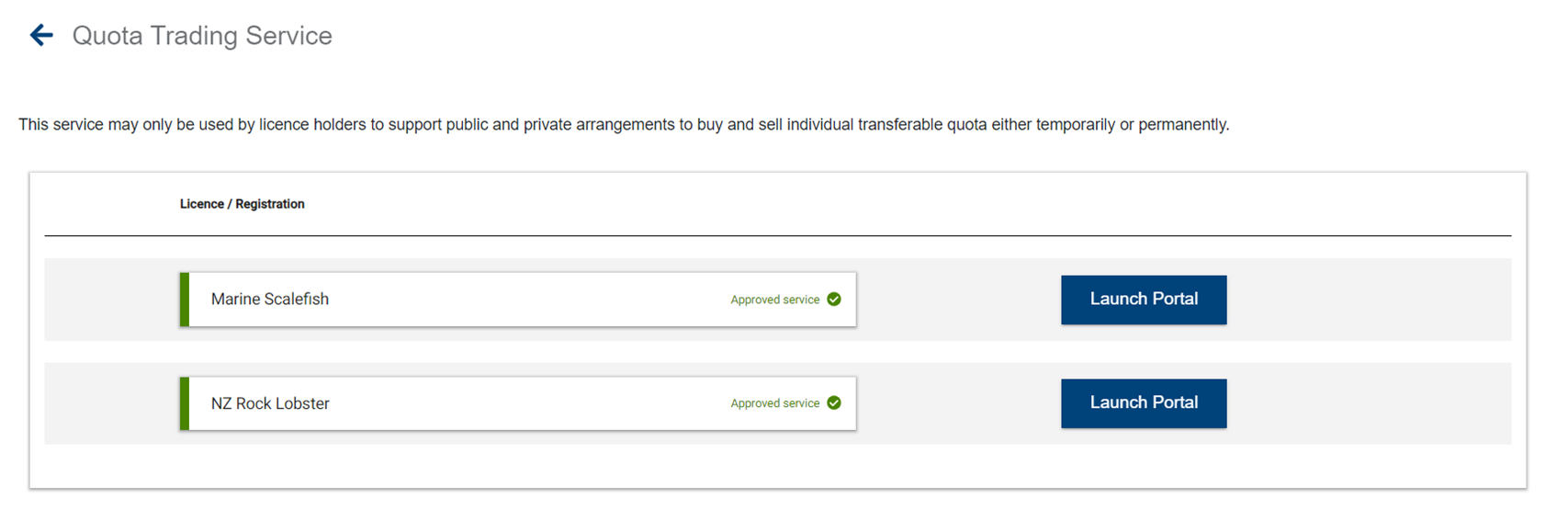
- Select the "Launch Portal" button for the relevant fishery. You will be directed to the Main Listings page for that fishery where you can:
- Read general information pertaining to the fishery.
- See private and public advertisements for quota transfers
- Filter on Offer Type – Private / Public Advertisements
- Filter on Type of transfer – Permanent / Temporary Transfers
- Filter on Entitlement/s relevant for that fishery (if applicable)
- See the total number of advertisements placed that are either available or pending. If there are more than 8 advertisements, the Next and Previous buttons will be available to navigate between pages.
Make a new listing
Add new public / private listing
To place either a public or private advertisement, select "Add new public / private listing" button at the top of the screen.

Where there are drop down lists available on the New quota listing page, you’ll find a selection of applicable licences and entitlements to choose from. If the advertisement is designated as ‘Private,’ only the seller and the nominated buyer licence holder will have visibility to act upon that licence.
All fields that are marked with an " * " are mandatory and must be filled in to place an advertisement.
Transfer Type – Nominate whether the transfer is Temporary or Permanent.
Seller Licence – A drop down list of applicable licences that is recorded against you as a Licence Holder or a Director of a Company that is a Licence Holder.
Offer Type – Nominate whether the transfer is Public or Private
- Private Offer: Only the seller and buyer Licence Holder will have access to see this Advertisement.
- Public Offer: To place an Advertisement which is then available to all Licence Holders of the relevant Fishery an offer against.
Buyer Licence – This is only shown if Private Offer is selected, and a list of all available licences for that Fishery sector will be displayed in the drop-down list.
Entitlement & Units – The quota that can be transferred will be specific to each Fishery based on what is available against the nominated licence and entitlement.
Contact Details – The Licence holder can nominate the best way to contact method regarding this advertisement.
Total Price – The total cost of the transfer between the Seller and Buyer.
Additional Comments – Relevant information that you wish to provide relating to the advertisement.
After reading and agreeing to the applicable Terms and Conditions relevant to your Advertisement, the Save button becomes active. Once the Save button has been selected a pop-up message will be displayed to advise:
- Success: There is sufficient quota, and your Advertisement will be listed on the main listings page for that Fishery.
- Error: The quota entered is not available against that licence and entitlement. You’ll need to correct this to place your Advertisement.
Private advertisements
Private offer
- When a private offer is created, the Licence Holder (Buyer) will receive an email notifying that there is a Private Transfer for review, the email will have a link to the application, which the licence holder will need to log onto myPIRSA to access the Quota Trading Service application to review. It is recommended that the Licence Holders are in discussion prior to placing a Private Advertisement.
- Once logged into the Quota Transfer service, the Licence Holder (Buyer) will see the Private Advertisement on their main listings page. By selecting the Private Advertisement, the page is redirected to show a summary of the transfer. The Licence Holder can decide to:
- Accept the Transfer – To accept the offer, read and accept the Terms and conditions relevant to the Advertisement and Select Accept. A pop-up message will appear to confirm that you wish to accept the offer. Select Proceed to payment, and the page will be redirected to the payment page.
- Reject the Transfer – If the transfer is cancelled, the Advertisement is deleted. The Licence Holder (Seller) will receive an email with subject Private quota transfer offer declined.
- If the offer has been Accepted, the application payment must be made by either Visa or Mastercard. Upon successful payment, the transfer request is forwarded to Fisheries and Aquaculture for review and approval.
- The transfer is not considered complete until it has been approved by Fisheries and Aquaculture
- The Seller and Buyer will be notified by email.
- When the transfer has been approved with a current copy of the Entitlement register
Buyer reviews advertisement
- Once logged into the Quota Transfer service, the Licence Holder (Buyer) will see the Private Advertisement on their main listings page. By selecting the Private Advertisement, the page is redirected to show a summary of the transfer. The Licence Holder can decide to:
- Accept the Transfer – To accept the offer, read and accept the terms and conditions relevant to the advertisement and select Accept. A pop-up message will appear to confirm that you wish to accept the offer. Select Proceed to payment, and the page will be redirected to the payment page.
- Reject the Transfer – If the transfer is cancelled, the advertisement is deleted. The Licence Holder (Seller) will receive an email with subject Private quota transfer offer declined.
- If the offer has been accepted, the application payment must be made by either Visa or Mastercard. Upon successful payment, the transfer request is forwarded to Fisheries and Aquaculture for review and approval.
Transfer completion
- The transfer is not considered complete until it has been approved by Fisheries and Aquaculture.
- The Seller and Buyer will be notified by email if approved or declined.
Timeframes
- The Licence Holder (buyer) has up to 5 days to accept the transfer offer, if the offer has not been accepted within this timeframe the transfer is deleted.
- Once the Licence Holder (buyer) has accepted the transfer, they have 4 days to make the application payment. ;If no payment has been made within this timeframe, the transfer will be deleted.
Public advertisements
A public advertisement is available to all Licence Holders for the relevant fishery and the status is not Pending or Private.
Buyer places an offer on a Public Listing
- When a public offer is created, it is visible to all Licence holders for that fishery on the listing page to make an Offer.
- To place an Offer on a Public Listing, select the Advertisement and select Make Offer. The page is redirected to the Complete Offer page. To place an offer, the licence holder must nominate an applicable licence to transfer quota against, read and accept all terms and conditions and then Select Make Offer button. A pop-up message is displayed to advise that an offer was successfully made.
- On the main listing page, the Advertisement is marked as Pending, and other Licence Holders will not be able to place an offer while pending.
- The Seller receives an email that an Offer has been placed.
- The Licence Holder (Seller) will receive an email with a link to the offer. Once logged onto myPIRSA, the Licence Holder will be directed to the transfer details for review. Should the Licence Holder log onto myPIRSA without the link, all Offers will be placed in the Received public offers section. By selecting this section, the page is redirected to show the history of all offers, both active and completed.
Seller reviews offer
- Select an Active Offer and the page is redirected to display the offer details of the Advertisement where the Seller can:
- Accept the Offer – Buyer is emailed that the offer has been accepted
- Declines the Offer – The Advertisement is relisted, and Buyer is advised that the Offer was not accepted.
- Once the Seller has approved the Offer, the Buyer can finalise the transfer and pay the Quota Transfer application fee. By selecting the Application fee payment section, the page is redirected to show the history of offers, both active and complete
Buyer reviews and payment made
- Select an Active post in which payment has yet to be paid.
- Accept the Transfer – Buyer is required to make the application fee payment. The Seller is advised once payment has been made.
- Cancel the Transfer – The transfer is cancelled, and the offer is relisted and available to all Licence Holders to review. The Seller is advised that the transfer has been cancelled.
- If the application is accepted, the buyer is required to pay the Quota Transfer application fee. A record of this tax invoice is emailed to the buyer, once successfully processed.
- Fisheries and Aquaculture are advised that there is a transfer application to review.
Transfer completion
- The transfer is not considered complete until it has been approved by Fisheries and Aquaculture.
- The Seller and Buyer will be notified by email if approved or declined.
Timeframes
Once accepted, the buyer has 4 days to make the application payment. If no payment has been made within this time, the transfer will be relisted. Both the seller and buyer licence holders are advised that the transfer has been relisted.